
Life’s a Journey.
Take a Map.
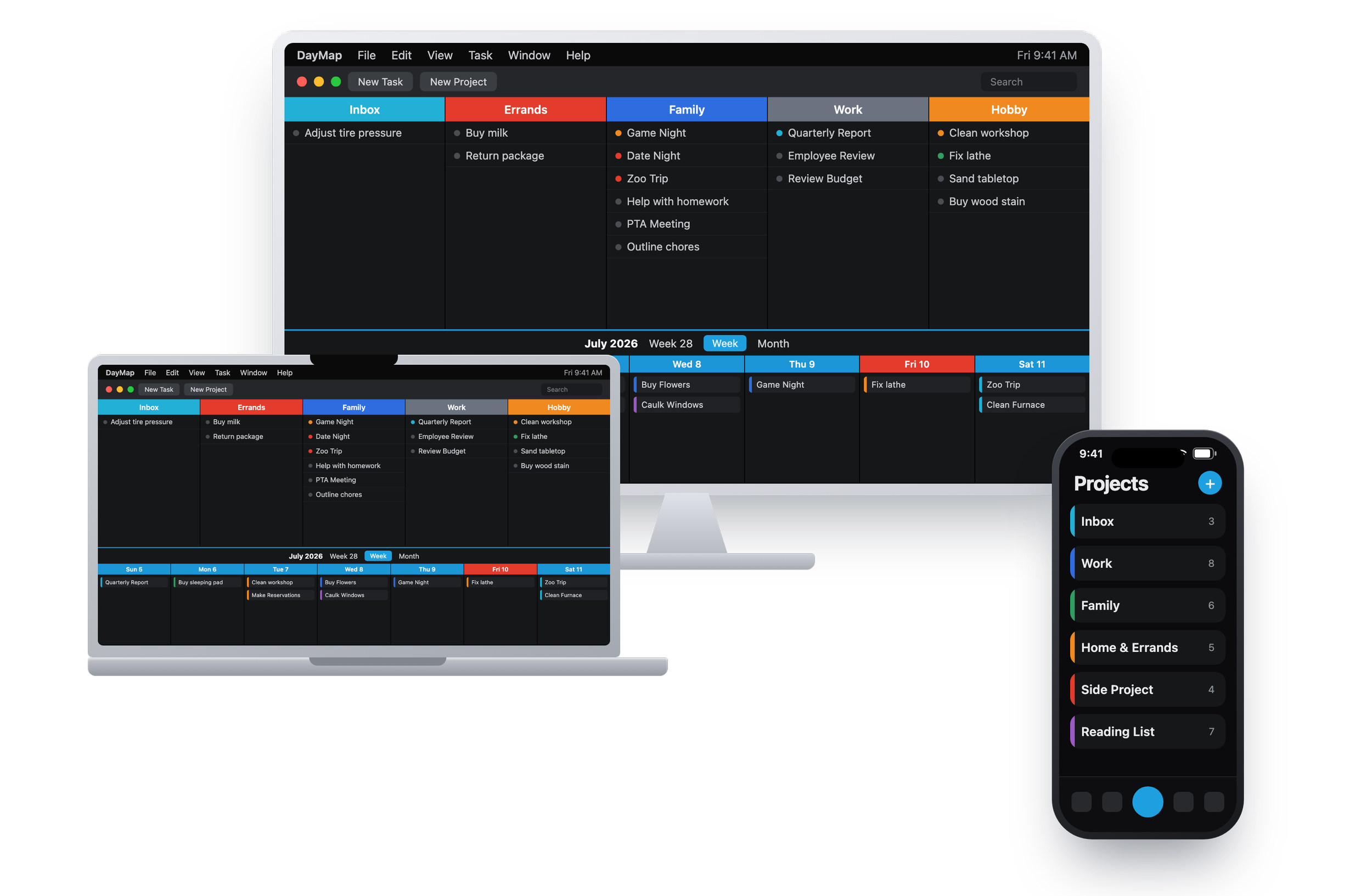
See your projects and your week on one map, so you always know where you are and what’s next.
For Mac, iPhone, iPad and Apple Watch.
Capture
Every task starts as a thought you had at the wrong moment. The Inbox takes it — from a system-wide Quick Add on the Mac, your voice on the Apple Watch, or Siri. Type “Email Tom back on Tuesday” and DayMap reads the day out of the sentence. Nothing has to be filed yet. Getting it down is the whole job.
Organize
The Project Planner is a board of colored columns, one for each project. Break any task into subtasks, nested as deep as the work actually goes. Group projects into Areas — Work, Family, whatever you keep separate — and filter the board to one when the rest can wait. The colors do the remembering, so you find things without reading every row.
Plan
The Task Scheduler sits directly below the board, so planning is one movement: pull a task from its column onto a day. It keeps its project color, and the week reads at a glance. Give it a time and it lands on the timeline. Switch between Week, Next 7, Month and Upcoming. Repeating work schedules itself.
Do
Focus shows a single day and nothing else — no board, no week, nothing to scroll past. Pick your 3 Daily Bearings, the three things that matter most, ranked one to three. Tick work off as you finish it. At the end of the day, Waypoint asks a few questions if you want them, and anything unfinished can carry to tomorrow.
Free
- Up to 5 projects
- One device — no iCloud sync
- Project Planner, Task Scheduler & Inbox
- Fully local — no account needed
Free forever. Upgrade any time.
Pro Monthly
- Unlimited projects
- iCloud sync across all your devices — including Apple Watch
- Calendar sync — Apple & Google
- Recurring tasks & Areas
Billed monthly. Cancel anytime.
Pro
- Unlimited projects
- iCloud sync across all your devices — including Apple Watch
- Calendar sync — Apple & Google
- Recurring tasks & contexts
Then $34.99 USD/year after your free trial. Cancel anytime.
Lifetime
- Everything in Pro, forever
- Pay once — no subscription
- Sync, calendar & recurring included
- All future updates
One payment, forever. No subscription, no renewals.
One planner for work, home and school
Each client, report and team gets a project. The week shows when you'll do the work, not just when it's due.
A simple demonstration, not the app itself. DayMap does much more than this, and some things look and work a little differently.
The house, the family calendar and the weekend project, each in its own place, with the chores that come back every month.
A simple demonstration, not the app itself. DayMap does much more than this, and some things look and work a little differently.
Every class becomes a project. Readings, papers and problem sets go on the day you'll do them, so nothing piles up before the exam.
A simple demonstration, not the app itself. DayMap does much more than this, and some things look and work a little differently.
Share a project and you each see the same tasks on your own devices. Tick one off and it's ticked off for them too.
A simple demonstration, not the app itself. DayMap does much more than this, and some things look and work a little differently.
Pro Anything marked Pro, and syncing between your devices, is part of DayMap Pro. Free DayMap gives you up to 5 projects on one device, with your 3 Daily Bearings.
See your whole life, then plan your day
DayMap lets you organize your projects and tasks by visually mapping out your life, one week at a time, allowing you to see your projects, tasks and schedule in an intuitive and user friendly interface.
-
Projects and calendar, together
Every project is a colored column in the Project Planner, with your week or month right below it. Drag a task onto a day and it keeps its project's color, so you can see where your week is going at a glance.
-
3 Daily Bearings
Name the three tasks that matter most today, and rank them 1, 2, and 3. Keeping the list to three helps you focus your attention and energy on what will make the day meaningful and productive.
-
Overlook Pro
Your day from the high point on the trail. It opens the first time you open DayMap each morning: your bearings, what's at a set time, what's due, and what carried over from yesterday.
-
Focus
One day, one list. Today's tasks on the left, the one you're working on open on the right, and nothing else on screen. On Mac and iPad.
-
Areas Pro
Group projects into Work, Family, Home, or whatever you keep separate. Filter the board to one area when the rest can wait, and let a project appear in more than one.
-
Capture anywhere
Get it out of your head the moment it arrives. Quick Add from anywhere on your Mac, voice capture in your own language, or, with Pro, a word to your Apple Watch. It all lands in the Inbox to sort later.
-
Repeating tasks and deadlines Pro
Every weekday, every other week, the third Thursday of the month. Move or skip a single day without touching the rest of the series, and give anything a deadline, with a time if it needs one. Deadlines are free; repeating needs Pro.
-
Your calendar, both ways Pro
See your Apple or Google calendar events beside your tasks, and send scheduled tasks to the calendar you choose. Use one direction or both.
-
Share a project Pro
Invite someone into one project and work on the same tasks together. Check something off and it's done for both of you. Everything else stays yours.
-
Waypoint Pro
An optional end-of-day journal. A few short questions and a couple of minutes to mark where you are before tomorrow. No streaks, no scores, and only you can read it.
On Mac, iPad, iPhone and Apple Watch, with Home Screen widgets. No ads and no tracking. Features marked Pro need DayMap Pro, which also syncs everything through your own iCloud, Apple Watch included.
“I nearly cried when I saw your app! For years, that is EXACTLY how I’ve planned my week, and I’ve never seen it in app form, so I’m thrilled!”
“Daymap could truly be the app I’ve searched for forever — lean, focused, and designed precisely for what you need every day.”
“A very intuitive and customizable organizing app… Customer support is excellent.”
“Ignore all other to-do apps. This is truly the one that has given me full control of all my tasks. Being able to see the big picture is super powerful.”
“DayMap allows me to manage multiple projects at once, drilling down instantly where I need it. It’s immediately intuitive.”
“I downloaded DayMap to my Mac and HELLO! It was exactly what I’d been looking for and I didn’t even know it.”
“DayMap is an extraordinary app, and I use it every single day.”
“I’ve tried lots of to-do and project apps, and DayMap is the one I really enjoy.”
“This is exactly how I have always wanted to plan my days.”
“It is a real game changer in the ToDo list organizer space.”