
DayMap Media
& Press Kit
Everything you need to write about, review, or interview DayMap — ready-to-use copy, high-resolution screenshots, logos, brand colors, and founder materials. Take what's useful, edit it freely, and reach out any time.
Life's a Journey. Take a Map.
No email required. No form. Everything on this page is free to download and use.Write it your way — or lift ours
Three lengths, already approved. Copy them straight into a post, a show description, or a review. No attribution required, though a link to daymapapp.com is always appreciated.
DayMap is a personal productivity app for Mac, iPhone, iPad, and Apple Watch that helps you see your whole life — areas, projects, weeks, and days — in one place, so you can plan a day before you live it.
DayMap is a visual planner for people who are tired of staring at a list. Instead of one flat inbox of tasks, DayMap shows four horizons at once — your areas of responsibility, the projects inside them, the week ahead, and today — so every task is connected to something that matters. Drag work onto a day, set three daily bearings, and start the morning knowing where you're going. Available on Mac, iPhone, iPad, and Apple Watch, with iCloud sync.
DayMap is a personal productivity app built on a simple conviction: life is bigger than a to-do list. First released in 2011 and rebuilt from the ground up for today's devices, DayMap gives you a map of your life rather than another inbox to clear — areas of responsibility, the projects inside them, the week you're steering, and the day in front of you, all visible in one place.
The app pairs a drag-and-drop Project Planner with a Task Scheduler calendar, so moving a task to Thursday takes a second and redrawing a wrecked week takes about as long. Each day is anchored by three Daily Bearings — the small number of things that, if finished, would let you end the day at peace.
DayMap runs on Mac, iPhone, iPad, and Apple Watch and syncs through iCloud. It is free to use for up to five projects, with a Pro subscription and a one-time lifetime option available. DayMap is made by Todd Cothran, an independent developer, and lives at daymapapp.com.
Tagline: Life's a Journey. Take a Map.
Positioning: DayMap is the practice of seeing a day before you live it — a visual planner that shows your life, not just your list.
The DayMap Comeback Story
The app went away. Its users never did.
DayMap started in 2011, before “productivity app” was a category with a thousand entries in it. The problem was ordinary and personal: too many responsibilities, no good way to see them all at once, and a to-do list that grew faster than the day did.
So we built something different—a visual planner where you could organize your work, drag tasks onto a calendar, and actually see the shape of your week take form.
DayMap found its people. Not a mass audience, but a devoted one—the kind who sent feature ideas, told us they had used DayMap every workday for years, and built much of their professional lives around it.
Then development stopped. Life moved on, technology moved on, and DayMap went away.
The users didn't. For years, emails kept arriving with some version of the same question: Is DayMap ever coming back?
Now it is.
DayMap has been rebuilt from the ground up for today's Apple devices, with a cleaner interface and iCloud sync across Mac, iPhone, iPad, and Apple Watch. But something else changed during the years away: the thinking behind DayMap became clearer.
Productivity isn't about cramming more into your day. It's about seeing what matters, deciding where it belongs, and moving it forward. It's about getting beyond the endless to-do list so you can see the bigger picture—your responsibilities, your projects, your commitments, and the day in front of you.
That philosophy is now captured in a short companion booklet, Day Mapping: Build a Life One Day at a Time. It's free to read, with no screenshots and no feature tour, because the method doesn't depend on the app. It's a simple approach built around four movements: Capture. Organize. Plan. Do.
That's the DayMap story: not a startup story, but a comeback story. An independent app that found a devoted following, went away, and came back because its users never stopped asking for it.
The app went away. Its users never did. And now DayMap is back.
The details you'll need in the first paragraph
Everything here is current and cleared for publication.
| Product | DayMap — personal productivity and day planning |
|---|---|
| Originally launched | 2011 |
| Development paused | 2020 — last release; removed from the App Store in 2023 |
| Relaunched | 2026, rebuilt from the ground up |
| Platforms | macOS, iPhone, iPad, and Apple Watch — one purchase covers all four, synced over iCloud |
| Pricing | Free — up to five projects with unlimited tasks · Pro — $4.99/month or $34.99/year, the year with a 14-day free trial · Lifetime — $119.99, one time |
| Founder & developer | Todd Cothran, independent |
| Website | daymapapp.com |
| App Store | apps.apple.com/app/daymap |
| Companion booklet | Day Mapping: Build a Life One Day at a Time — free at daymapapp.com/day-mapping |
| Philosophy | Life is bigger than a to-do list. A list tells you what exists; a map helps you decide where to go next. |
| Signature features | Four horizons (areas → projects → week → day), the drag-and-drop Project Planner, the Task Scheduler calendar, and the 3 Daily Bearings |
| Press contact | support@daymapapp.com |
High-resolution imagery
PNG, ready to drop into a post — click any tile and it downloads. Crop and resize freely; please don't alter the interface itself. All captures are dark mode; if you need light mode for your layout, ask and we'll shoot it.
Mac


iPhone


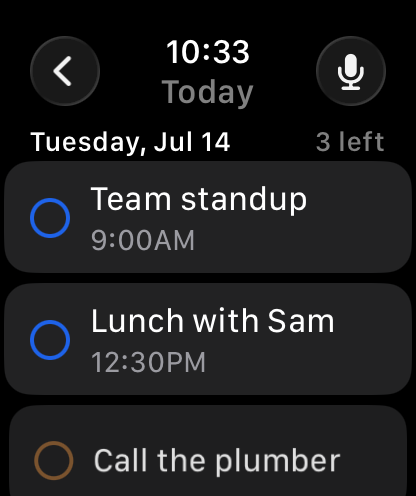
iPad and Apple Watch


All devices

Thirty-four images in the press kit, at full resolution: every view above plus Month and Upcoming on each device, as captured and as they appear in the App Store, and three Apple Watch screens.
Marks, colors, and how to use them
Two logo versions and the app icon, all PNG with transparent backgrounds. Use whichever reads best against your layout.


Brand colors
#2397FF#0F6FD1#101B2D#F7F9FC#7C8798✓ PLEASE DO
- Use the logo files as provided, at any size that stays legible.
- Leave clear space around the mark equal to the height of the “D”.
- Use the dark-background version on navy, black, or photographic backgrounds.
- Write the name as DayMap — one word, capital D, capital M.
- Crop or resize screenshots to fit your layout.
✗ PLEASE DON'T
- Recolor, outline, add gradients, or apply effects to the logo.
- Stretch, rotate, or rearrange the mark and the wordmark.
- Write it as "Daymap", "Day Map", or "DAYMAP" in running text.
- Edit the interface inside a screenshot, or mock up features that don't exist.
- Use the logo in a way that implies partnership or endorsement.
Todd Cothran

Todd Cothran is the founder and developer of DayMap, a visual productivity app he first built in 2011 and rebuilt fifteen years later after users kept asking for it back. He is also the author of Day Mapping: Build a Life One Day at a Time.
Todd Cothran is an independent developer, writer, and pastor, and the founder of DayMap. He built the first version in 2011 out of a personal problem — more responsibilities than any list could hold — and it gathered a devoted following before development stopped. Years of user requests brought it back; the rebuilt DayMap ships today on Mac, iPhone, iPad, and Apple Watch.
He is the author of Day Mapping: Build a Life One Day at a Time, a short book on the practice behind the app, and writes about attention, planning, and building a meaningful life out of ordinary days. He lives and works in the American South.
Suggested talking points
- Productivity without the overwhelmWhy the goal was never to keep up — and what it means to end a day at peace with an unfinished list.
- Why DayMap came backAn app that was shelved, and the users who wouldn't let it stay shelved. A comeback story rather than a startup story.
- Why to-do lists don't workA list shows everything at the same volume. A map shows where each thing fits — and that difference changes what you decide to do.
- Seeing your life, not just your listThe four horizons — areas, projects, week, day — and why most planners start at the wrong one.
- Three bearings, not ten prioritiesNavigators fix their position with three sightings. Why the cap of three is the feature, not a limitation.
- Building an indie app in a crowded categoryShipping alone across four Apple platforms, pricing with a lifetime option, and competing on philosophy instead of features.
Lines you're welcome to pull
All from Todd or from Day Mapping, cleared for quotation.
Writing about DayMap? Reviewing it? Want to talk?
Let's connect. Todd answers press email himself, usually within a day — whether you need a quote, a review license, a custom screenshot, or a guest for your show.
Booking a podcast or interview? Grab a time directly at daymapapp.com/book — or download the one-page guest sheet (PDF).